Cara

Cara HOA Management System

Modern Home Owners Management Made Simple

Cara is an all-in-one, web-based management system for homeowners associations (HOAs) and subdivisions in the Philippines. It runs billing and collections, real double-entry accounting with BIR-ready books, governance, security and community operations in one system with four portals: admin, member, guard kiosk and public site.

The only HOA platform with real books: full double-entry accounting built in, not bolted on.

Request a demo See the screens Flip through the brochure

At a glance

integrated modules
95+
portals: admin, member, guard kiosk, public site
4
database tables
165+
web-based, installable on phones
100%

Audit-ready books, on autopilot

Every bill, payment, payroll run and petty-cash expense posts a balanced journal entry behind the scenes. Run a trial balance, income statement or balance sheet on any day of the year, with no month-end scramble.

  • Chart of accounts pre-seeded for HOAs; system accounts protected
  • Auto-posted journal entries; manual entries for adjustments
  • Trial balance, income statement, balance sheet, cash flow and changes in equity, as a board-ready PDF pack
  • General ledger with drill-down
  • Bank reconciliation with a live cleared balance
  • Fiscal period close and lock
  • Void with a reason, never edit: a full audit trail
  • A built-in health check that ties receivables, banks, deposits and fines to the ledger

Accounting and BIR books in detail →

Trial BalanceBALANCED
Cash in Bank₱1,842,350
AR – Dues₱328,900
Dues Income(₱1,954,000)
Payroll Expense₱412,500
Petty Cash Expense₱48,720

An excerpt with sample figures. The full trial balance always balances and updates with every posted entry.

What it runs

A few of the 12 areas boards ask about first. See all of them →

Smart Billing

Billing schedules, tiered water consumption, parking fees, late penalties and saved member groups for households on different rates. Itemized statements for every household in one click, with meter readings, month-by-month arrears and a scan-to-pay QR. Regenerate a single bill with balances and books kept correct.

Payment Plans

Put a homeowner's arrears on an installment agreement: a down payment and up to 36 monthly installments, a printable agreement and the signed copy on file. While the plan is kept, late penalties stop and the household stays off the disconnection list and overdue reminders. New bills must still be paid; a plan behind past its grace days defaults on its own.

Violations & Fines

A numbered Notice of Violation, the homeowner's reply in the portal, then uphold or dismiss. The fine follows the violation type and whether it is a 1st, 2nd or 3rd offense within 12 months (₱0 is a warning). Pay it at the counter with its own receipt or add it to the next bill as its own line; either way it posts to the books.

Cashier Closing & Paper Receipts

Each cashier counts the drawer against everything they recorded; a checker confirms, and any shortage or overage posts to Cash Short and Over. Official receipt booklets are issued per cashier, each OR number is used once, and skipped numbers are flagged.

Books of Accounts

General Journal, General Ledger, Cash Receipts and Cash Disbursements books for any period, as PDF and CSV. Every page carries the registered name, TIN, RDO, address, acknowledgement certificate number and "Page X of Y"; voided entries stay listed so the entry-number series has no gaps.

DHSUD Compliance Pack

One ZIP per year for RA 9904 reporting: annual report, membership register (PDF and CSV), members in good standing, board and officers, financial statements, assemblies and resolutions, and meeting minutes, all from records already in the system, with a contents page listing what to attach by hand. Requirements vary by DHSUD regional office; confirm the checklist before filing.

Gate Pass

QR-coded visitor passes requested by members, scanned at the guard kiosk, with entry and exit logs.

Work & Construction Permits

Owners file repair and renovation permits in the portal with the contractor and worker list. Approval waits until the coordination meeting with the contractor's representative is recorded, then issues a numbered Work Certificate. Guards see today's permits and workers at the gate.

Preventive Maintenance

Recurring upkeep on schedule: pump servicing, tank cleaning, generator runs, CCTV checks, fire extinguishers. Each task has its frequency, checklist and assigned staff or provider; log it done or skipped with photos and cost notes. Overdue and due-soon tasks show in the admin bell.

Equipment Lending

Lend chairs, tables, tents and the sound system, free or for a fee per day, with or without a refundable deposit. Members request in the portal; the office reserves, hands over with a receipt and checks items back in. Overlapping bookings are refused; fees and deposits post to the books.

Member Portal & PWA

Installable on any phone as an app, with offline bill viewing, push notifications and mobile navigation. Give the portal your association's own name.

AI Member Chatbot

Members get answers about their bills, payments, events and community information from a chat assistant on every page.

See Cara in action

Real screens from the admin portal, with demo data. All 14 screens →

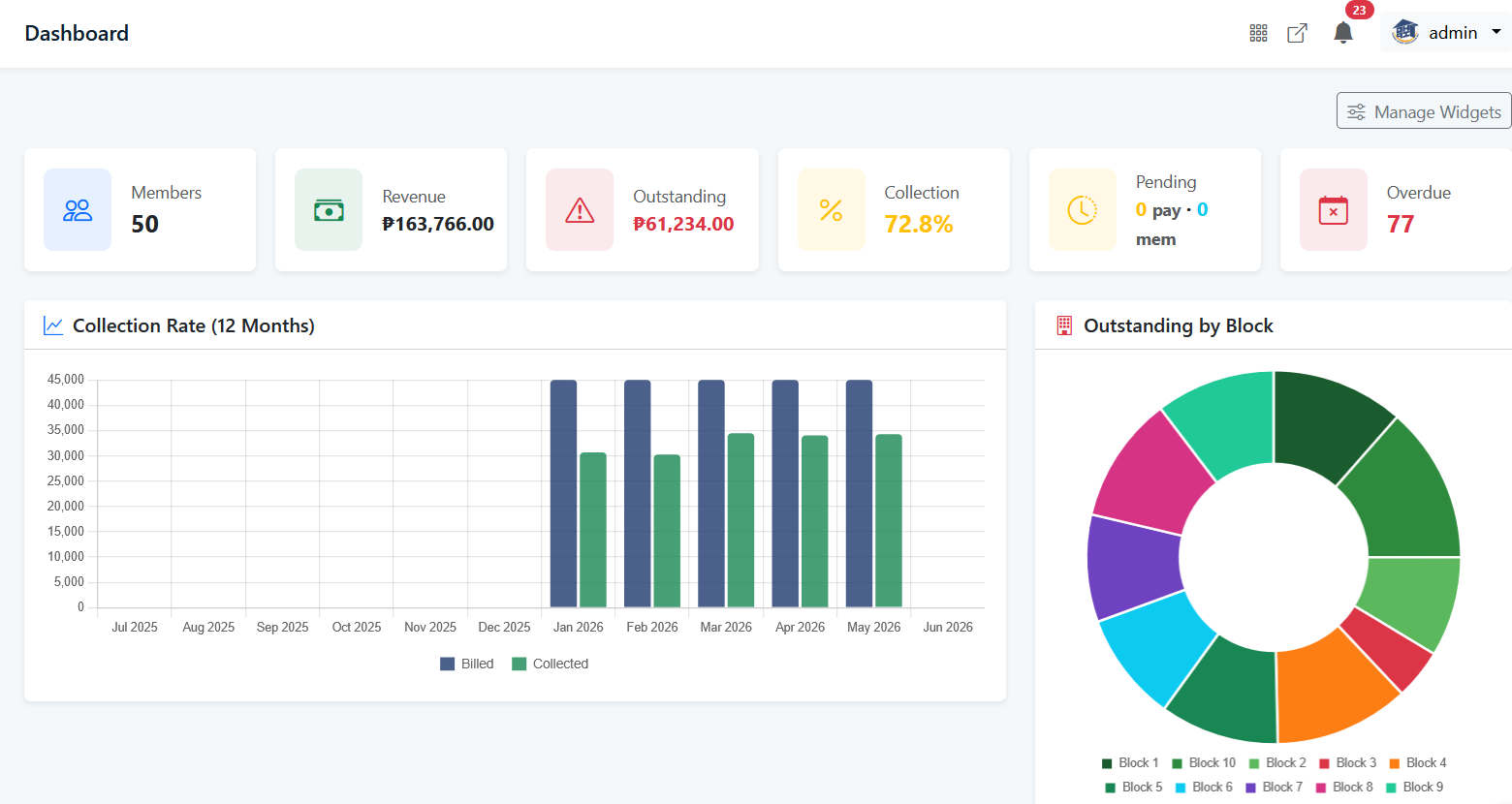
The admin dashboard: key figures for collections, outstanding balances and members at a glance.
Admin dashboard The admin dashboard: key figures for collections, outstanding balances and members at a glance.
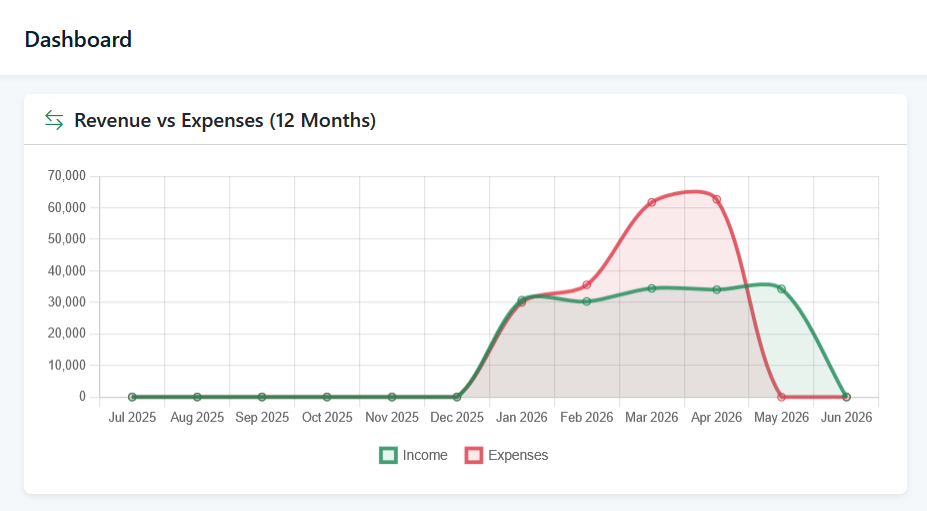
A 12-month chart of revenue against expenses from the books.
Revenue vs expenses A 12-month chart of revenue against expenses from the books.
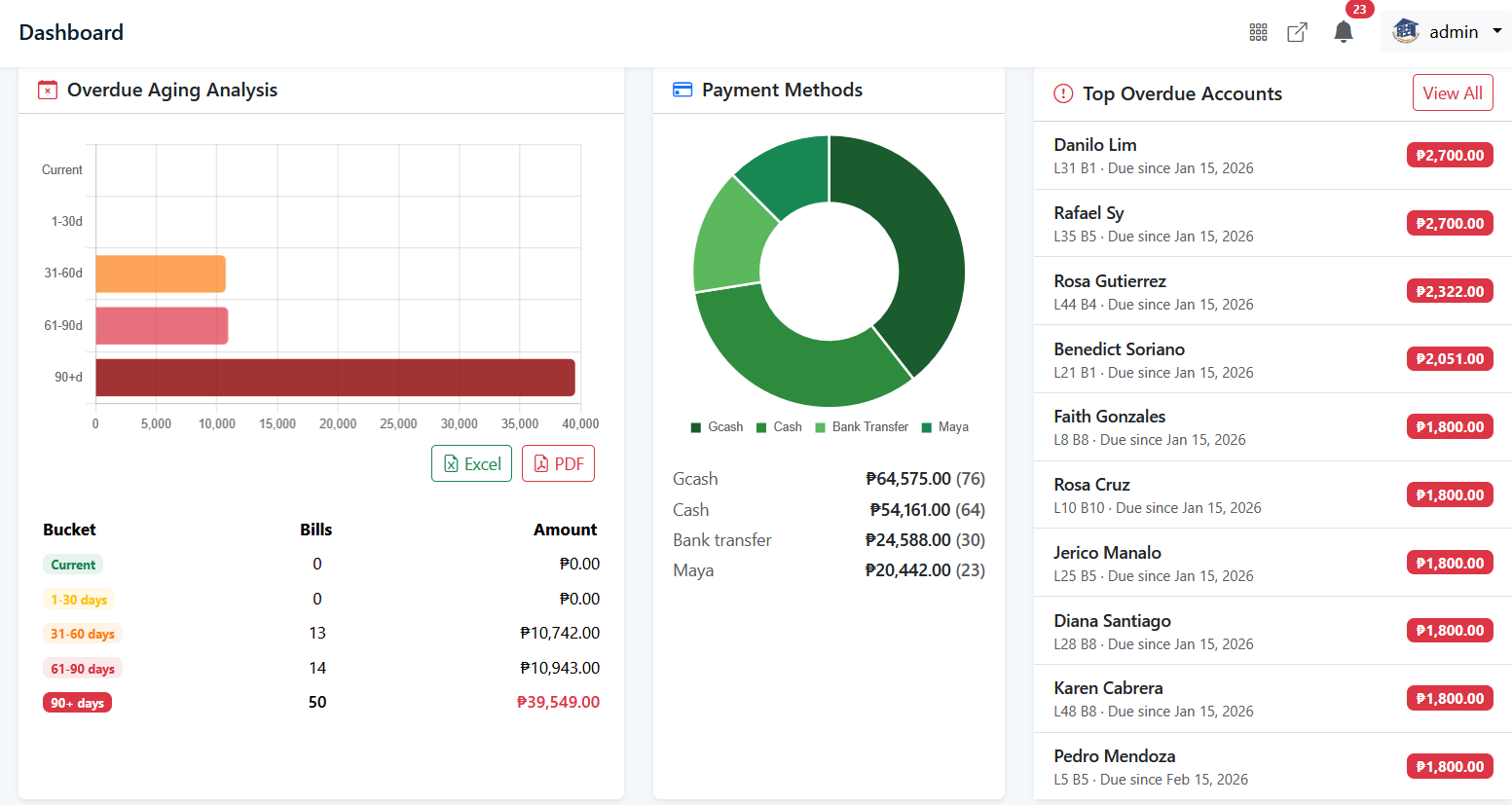
Outstanding balances by how long they are overdue, and collections split by payment method.
Overdue aging and payment methods Outstanding balances by how long they are overdue, and collections split by payment method.
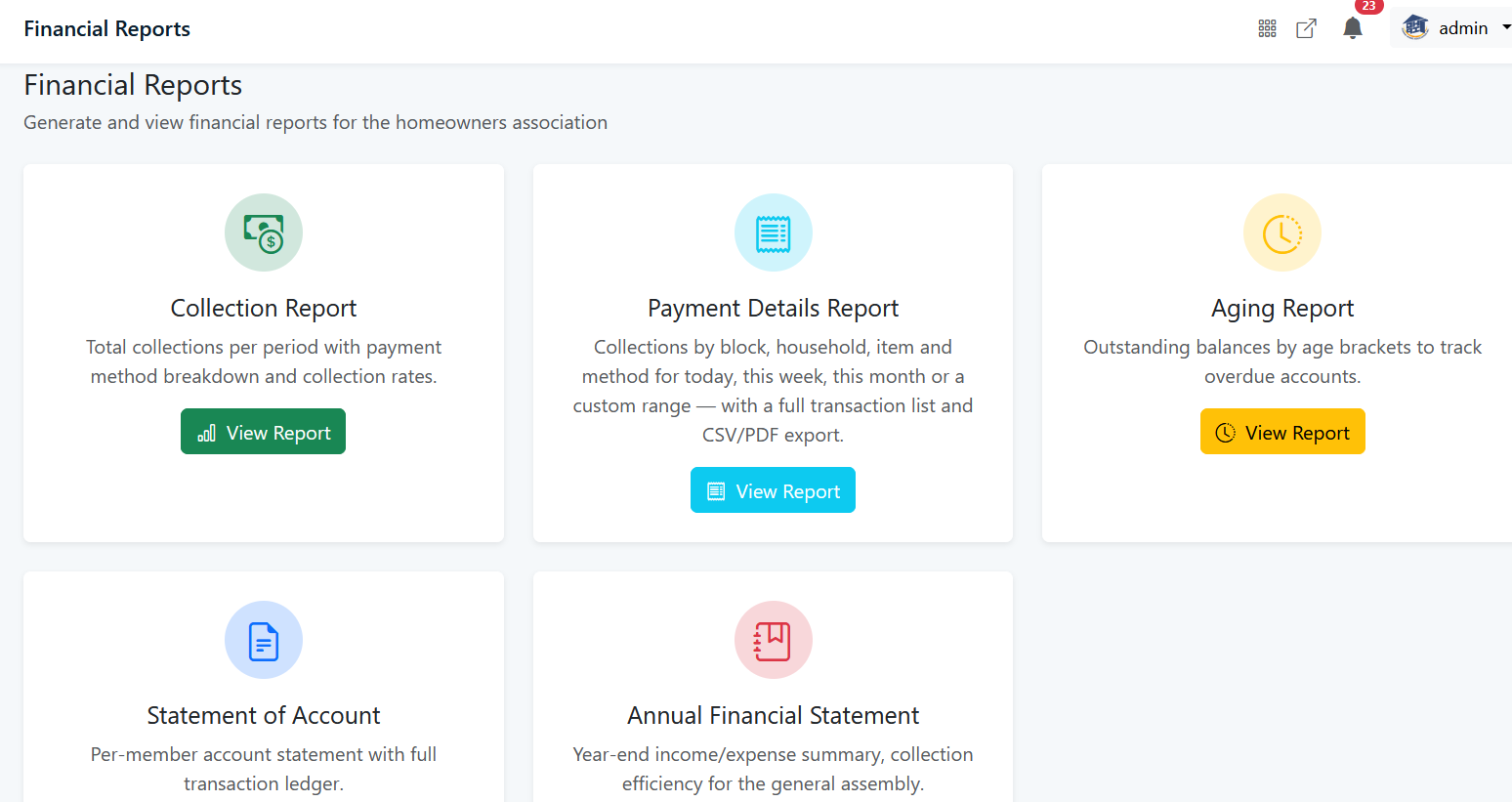
The reports hub: collection, aging, payment details, statements and the other financial reports in one place.
Financial reports hub The reports hub: collection, aging, payment details, statements and the other financial reports in one place.
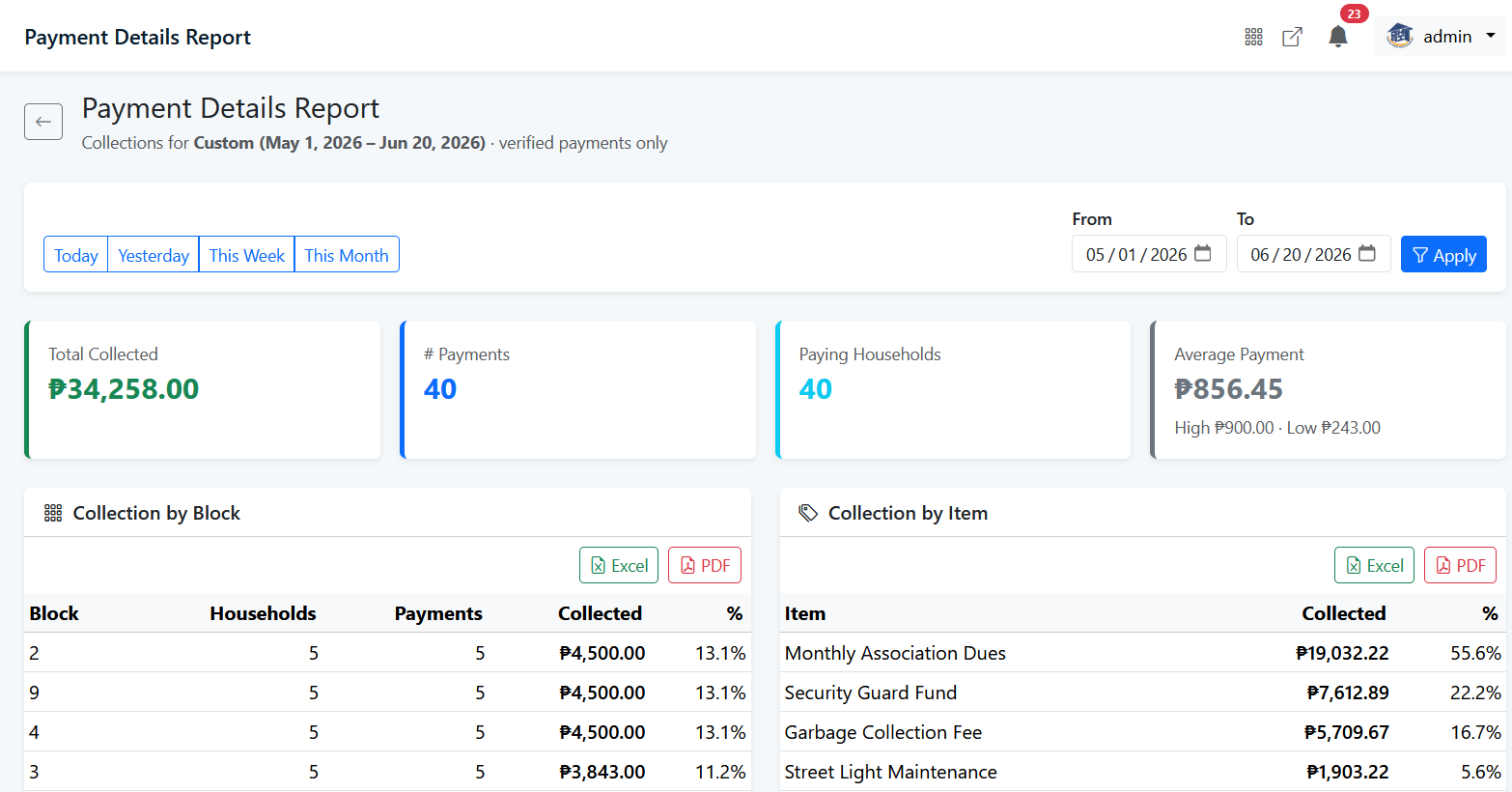
Every payment with what it paid for, filterable by charge and method.
Payment details report Every payment with what it paid for, filterable by charge and method.
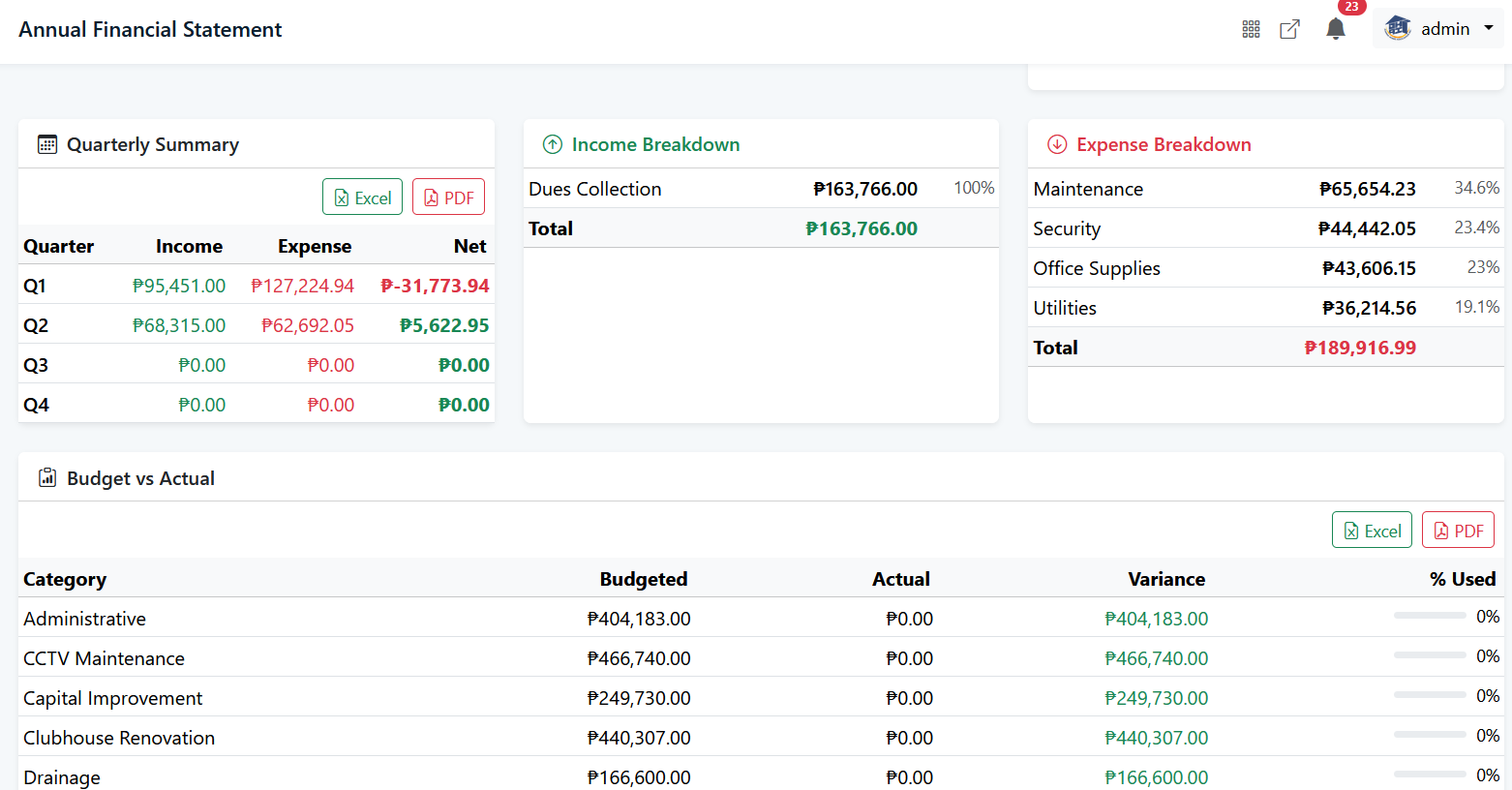
The year's financial statement for the Board and members.
Annual financial statement The year's financial statement for the Board and members.

Four portals, one system

Admin portal

For officers, the office and the treasurer: billing, payments, accounting, reports, operations and settings, with module-by-module read/write permissions per user or group.

Member portal

For homeowners: bills and receipts, pay by QR with proof upload, requests (gate passes, reservations, work permits, equipment), replies to violation notices, payment plan, documents, voting and community features. Installable as a phone app (PWA) with push notifications.

Guard kiosk

For the gate: PIN login, QR gate-pass scanning, entry and exit logs, today's work permits and their workers, and the day's move-ins and move-outs.

Public site

The association's own website: announcements, events, officers and optional public financial transparency reports.

Why associations switch

Eliminate paper-based processes

No more manual logbooks, handwritten receipts or lost documents. Everything is digital and searchable.

Real-time visibility

Dashboards give the Board instant insight into collection rates, outstanding balances and community health.

Save hours every week

Automated billing, penalties, aging reminders and reports free the office for what matters.

Books your auditor can follow

Every transaction posts a balanced entry; nothing is silently deleted.

Ready to modernize your HOA?

Get a free demo and see how Cara can run your community's billing, books and operations.

Request a demo info@sugbo.homes